The Best Computer Mice of 2026
| Product | Score | Shape & ergonomics(30%) | Sensor & tracking(20%) | 3-Year Cost |
|---|---|---|---|---|
 Logitech MX Master 3SBest Overall |
8.4 |
9.5/10 |
7.5/10 |
$89.99checked Sep 15, 2026 |
 Razer DeathAdder V3 ProAlso Great |
8.1 |
8.0/10 |
9.5/10 |
$79.99checked Sep 15, 2026 |
 Logitech G305 LIGHTSPEEDBest Value |
8.0 |
7.0/10 |
8.5/10 |
$65.75checked Sep 15, 2026 |
 SteelSeries Rival 3 Wireless Gen 2Also Consider |
7.6 |
7.0/10 |
7.0/10 |
$77.23checked Sep 15, 2026 |
 Glorious Model O 2 WirelessAlso Consider |
7.4 |
7.5/10 |
8.0/10 |
$85.00checked Sep 15, 2026 |
Sorted by score. Prices come from each seller's site on the date shown and change often.
Brand claim vs independent measurement
| Product | What the brand claims | Independent figure | Source |
|---|---|---|---|
| Logitech MX Master 3SDefault weight | 141 g | 141.2 g measured (RTINGS) | RTINGS |
| Razer DeathAdder V3 ProDefault weight | 64 g | 61.7 g measured (RTINGS) | RTINGS |
| Logitech G305 LIGHTSPEEDDefault weight | not listed on Logitech's product page | 101.7 g measured (RTINGS) | RTINGS |
| SteelSeries Rival 3 Wireless Gen 2Battery life, 2.4 GHz mode | 175 hours (2x AAA), per SteelSeries' product page | No independent lab figure found for this generation as of Sep 16, 2026 | SteelSeries (no third-party test found) |
| Glorious Model O 2 WirelessBattery life, 2.4 GHz mode | 110 hours, per Glorious' product page | No independent lab figure found as of Sep 16, 2026 | Glorious (no third-party test found) |
We do not run these tests ourselves. Independent figures are quoted from the source named in each row.
The Logitech MX Master 3S is the best computer mouse for most desks in 2026. It scored highest in our research because of its ergonomic shape, a battery Logitech rates for up to 70 days per charge, and Bluetooth pairing across three devices at once. If your priority is gaming instead of office comfort, the Razer DeathAdder V3 Pro and Logitech G305 LIGHTSPEED trade some of that ergonomic bulk for a lighter body and a sensor built for fast, competitive tracking.
Budget shoppers should look at the G305, which Logitech prices at $59.99 and which RTINGS measured at 101.7 grams with what its reviewers called great click latency. Gamers who want to switch between a 2.4 GHz dongle and Bluetooth on the same mouse should look at the SteelSeries Rival 3 Wireless Gen 2. Anyone who wants the lightest mouse in this group, at a claimed 68 grams, should look at the Glorious Model O 2 Wireless. Every pick here is built from published specs, a CPSC recall check, and named third-party measurements, not from testing in our own lab. Our full method is at /how-we-score/.
How we picked
We scored each mouse on five criteria: shape and ergonomics (30% of the total score), sensor and tracking (20%), battery life (15%), connectivity and buttons (15%), and 3-year cost (20%). Prices and specs came from each brand’s own US store: Logitech’s product pages for the MX Master 3S and G305, Razer’s page for the DeathAdder V3 Pro, SteelSeries’ page for the Rival 3 Wireless Gen 2, and Glorious Gaming’s page for the Model O 2 Wireless, with a Newegg listing and a MechanicalKeyboards.com listing filling in two prices that were not posted on the brand’s own page at the time of writing. Independently measured weight came from RTINGS’ published reviews of the MX Master 3S, the DeathAdder V3 Pro, and the G305 LIGHTSPEED. This guide is researched from published data and named third-party measurements, not tested in our own lab; see /how-we-score/ for the full method.
We also ran every product name through the Consumer Product Safety Commission’s saferproducts.gov recall database. As of Sep 16, 2026, none of the five mice in this guide turned up in a search for “computer mouse.” The only match in that search was a 2001 recall of a Cozy Coupe toy mouse with a detachable ball that posed a choking hazard, which has no connection to any product listed here.
What to look for
- Battery life of at least 70 hours per charge or per battery if you want to go a week or more of daily use without reaching for a charging cable or a spare AA cell.
- A DPI range that covers at least 800 to 8,000 so the sensor works for both fine detail work at a low sensitivity and fast cursor sweeps at a high one.
- Weight under 80 grams for competitive gaming, or under 150 grams for all-day office use, since RTINGS classifies anything heavier than that as a drag on fast wrist movement.
- A polling rate of at least 1,000 Hz if the mouse is going into a gaming setup; a fixed 125 Hz rate, like the MX Master 3S uses, is fine for browsing and spreadsheets but noticeably less smooth in fast-paced games, per RTINGS.
- PTFE mouse feet, which both the SteelSeries Rival 3 Wireless Gen 2 and the Glorious Model O 2 Wireless use, glide more consistently over time than the rubberized feet found on some older or cheaper mice.
- Dual connectivity, meaning both a 2.4 GHz USB dongle and Bluetooth on the same mouse, if you move between a desktop and a laptop during the day, since a Bluetooth-only or dongle-only mouse forces you to re-pair every time you switch.
FAQ
Do I need a high DPI mouse for everyday computer use?
No. For browsing, email, and office documents, a DPI setting between 800 and 1,600 is enough for most monitors, and every mouse in this guide supports that range. Higher maximum DPI numbers, like the 30,000 DPI Razer advertises on the DeathAdder V3 Pro, matter mainly for gaming at very high mouse sensitivity or for very high-resolution displays, not for typical office work.
Is a wireless mouse fast enough for competitive gaming in 2026?
Yes, if the mouse uses a dedicated 2.4 GHz gaming receiver rather than relying only on Bluetooth. RTINGS rates the Razer DeathAdder V3 Pro’s HyperSpeed Wireless connection as having incredibly low click latency in its testing, and the mouse supports polling rates up to 8,000 Hz with an optional separate dongle. A Bluetooth-only productivity mouse like the MX Master 3S, by contrast, has a fixed low polling rate that RTINGS says makes cursor movement feel less smooth in games.
How long should a mouse’s battery actually last?
For a mouse charged over USB-C, look for at least 70 hours per charge; the MX Master 3S clears that bar by a wide margin at a claimed 70 days. For a mouse that runs on AA or AAA batteries, look at the hours-per-cell figure rather than the total battery life claim, since that number tells you how often you will actually be swapping cells; the Logitech G305 runs up to 250 hours on a single AA battery, according to Logitech.
Have any of these mice been recalled?
No. We checked the Consumer Product Safety Commission’s saferproducts.gov recall database for “computer mouse” on Sep 16, 2026, and none of the five mice in this guide appeared. If you want to check a specific mouse yourself before buying, saferproducts.gov lets you search by product name for free.
Does a heavier ergonomic mouse feel different from a light gaming mouse?
According to RTINGS’ published reviews, yes. The MX Master 3S weighs 141.2 grams as independently measured by RTINGS, while the Razer DeathAdder V3 Pro weighs 61.7 grams by the same measurement, less than half as much. RTINGS’ written verdict describes the MX Master 3S as comfortable for extended office use but heavy for gaming, and the DeathAdder V3 Pro as extremely lightweight and built for fast in-game movement. Which one suits you depends on whether you spend more hours clicking through documents or through matches. For more accessories picks, see our /pc-accessories/ hub.
Best Overall: Logitech MX Master 3S
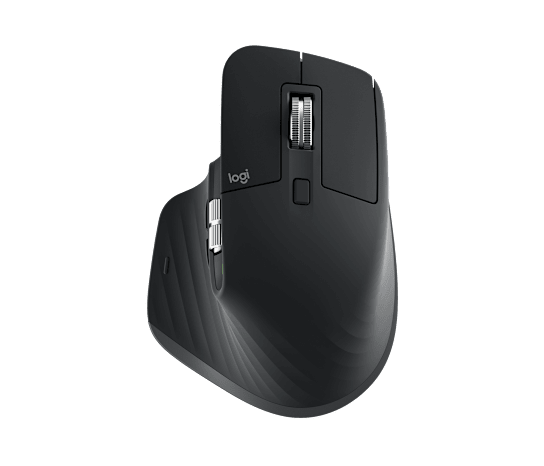
Logitech MX Master 3S
We don't earn anything from this link.
What we like
- +RTINGS calls it outstanding for office use
- +70-day battery life on a single charge, per Logitech
- +Pairs with up to 3 devices and switches between them with one button
What we don't
- −No onboard storage for the USB receiver
- −Fixed low polling rate makes cursor motion feel less smooth than a gaming mouse, per RTINGS
- −Fairly bulky for a laptop bag, per RTINGS
Skip it if
Skip it if you need a mouse for competitive gaming, or if you have small hands, since RTINGS rates it best suited to medium and large hands.
The Practical Math · 3 years
| Mouse (one-time) | $89.99 |
| Total | $89.99 |
Also Great: Razer DeathAdder V3 Pro

Razer DeathAdder V3 Pro
We don't earn anything from this link.
What we like
- +RTINGS calls its sensor extremely accurate and consistent with incredibly low click latency
- +61.7 g measured weight from RTINGS, far lighter than the ergonomic picks here
- +Optical switches rated for 90 million clicks by Razer
What we don't
- −No Bluetooth, HyperSpeed 2.4 GHz only
- −Right-handed shape best suited to larger hands, per RTINGS
- −8,000 Hz polling requires a separate HyperPolling dongle sold apart from the mouse
Skip it if
Skip it if you have small or medium-sized hands, or if you need Bluetooth to pair with a tablet or phone.
The Practical Math · 3 years
| Mouse (one-time) | $79.99 |
| Total | $79.99 |
Best Value: Logitech G305 LIGHTSPEED

Logitech G305 LIGHTSPEED
We don't earn anything from this link.
What we like
- +250-hour battery life from one AA battery, per Logitech
- +RTINGS rates its sensor performance and click latency as great
- +Full DPI range from 200 to 12,000 covers office and gaming use
What we don't
- −No Bluetooth, LIGHTSPEED USB receiver only
- −Small ambidextrous shape can feel cramped for large hands, per RTINGS
- −Two side buttons only, fewer than dedicated MMO mice
Skip it if
Skip it if you want Bluetooth multi-device pairing or a rechargeable battery instead of swapping AA cells.
The Practical Math · 3 years
| Mouse (one-time) | $59.99 |
| AA batteries, assuming 4 hours of use a day and one AA cell per 250 hours (about 6 cells a year at $0.32 each from a 48-pack) | $5.76 |
| Total | $65.75 |
Also Consider: SteelSeries Rival 3 Wireless Gen 2
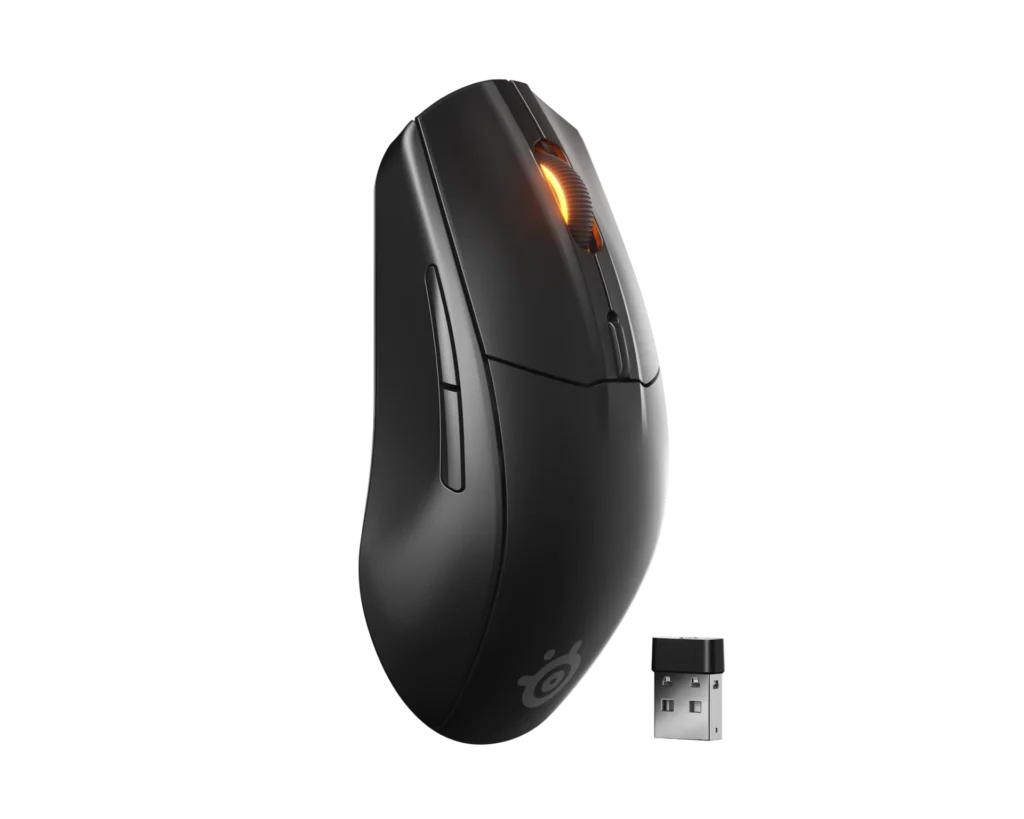
SteelSeries Rival 3 Wireless Gen 2
We don't earn anything from this link.
What we like
- +Runs on swappable AAA batteries, so a spare set gets you back to work in seconds
- +Dual wireless: 2.4 GHz dongle or Bluetooth from the same mouse
- +100% PTFE feet, switches rated for 60 million clicks by SteelSeries
What we don't
- −No independent lab test found to confirm SteelSeries' own DPI and speed claims
- −6 buttons only, fewer than higher-end gaming mice
- −Symmetrical shape is less specialized than a dedicated ergonomic mouse
Skip it if
Skip it if you want the lowest possible weight or a rechargeable battery instead of AAA cells.
The Practical Math · 3 years
| Mouse (one-time) | $58.99 |
| AAA batteries, assuming 4 hours of use a day on 2.4 GHz and 2 AAA cells per 175 hours (about 8 replacement pairs a year at $0.76 a pair from a 36-pack) | $18.24 |
| Total | $77.23 |
Also Consider: Glorious Model O 2 Wireless
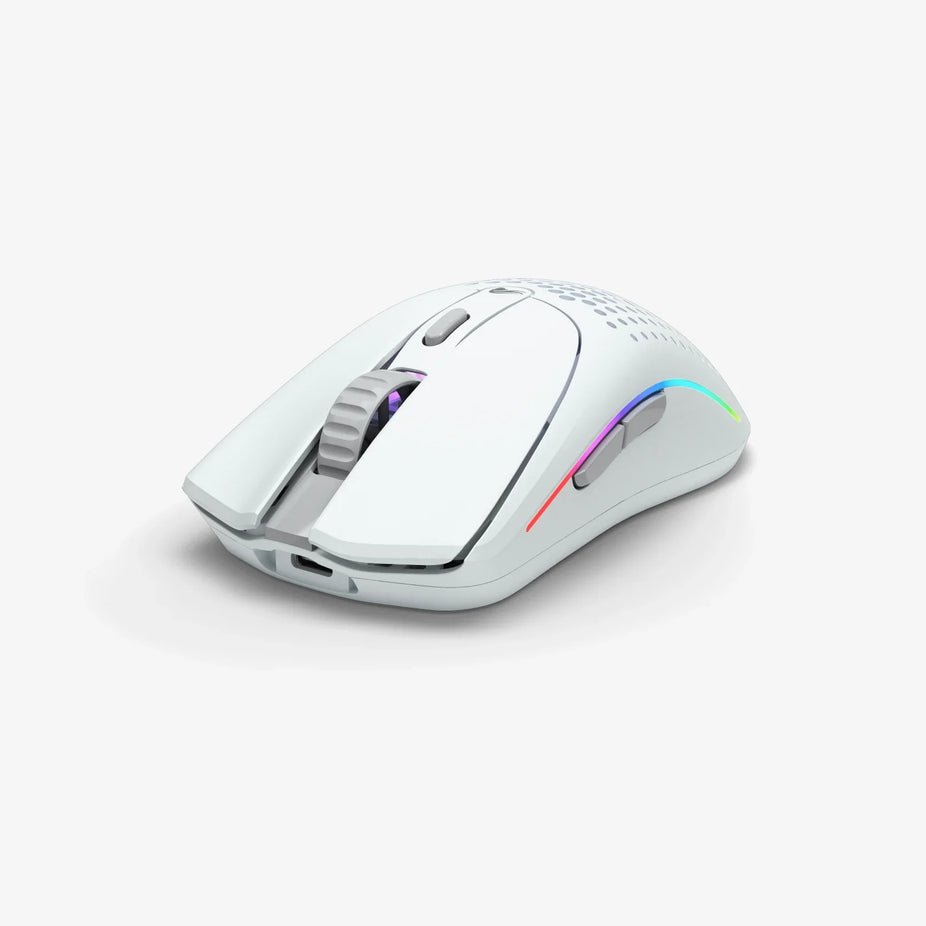
Glorious Model O 2 Wireless
We don't earn anything from this link.
What we like
- +68 g claimed weight, among the lightest mice in this list
- +Three ways to connect: 2.4 GHz wireless, Bluetooth 5.2, or wired USB-C
- +6 programmable buttons with RGB lighting
What we don't
- −Shortest battery life of the wireless picks here at 110 hours on 2.4 GHz, per Glorious
- −No independent lab test found to confirm Glorious' own sensor claims
- −Ambidextrous shape lacks the thumb rest of dedicated ergonomic mice
Skip it if
Skip it if all-day office ergonomics matter more to you than a gaming-focused ambidextrous shape.
The Practical Math · 3 years
| Mouse (one-time) | $85.00 |
| Total | $85.00 |
The specs that matter, in plain English
- DPI / CPI
- Dots (or counts) per inch, the unit that measures how far the cursor moves on screen for one inch of physical mouse movement. Higher numbers mean more sensitivity.
- Polling rate
- How many times per second a mouse reports its position to the computer, measured in Hz. A higher polling rate makes cursor movement look smoother, which matters most for fast-paced games.
- Lift-off distance
- The height above a mousepad at which the sensor stops tracking movement. A lower lift-off distance is generally preferred by gamers who lift and reposition the mouse often.
- IPS (inches per second)
- A measurement of how fast a mouse can be moved across a surface before the sensor starts losing accuracy. Gaming mice typically advertise IPS ratings well above 400.
What changed
- Jan 2, 2026 First published.
- Sep 16, 2026 Prices and recalls re-checked.
Sources we read
- Logitech MX Master 3S product page read Sep 16, 2026
- Logitech G305 LIGHTSPEED product page read Sep 16, 2026
- Razer DeathAdder V3 Pro product page read Sep 16, 2026
- SteelSeries Rival 3 Wireless Gen 2 product page read Sep 16, 2026
- Glorious Model O 2 Wireless product page read Sep 16, 2026
- SteelSeries Rival 3 Gen 2 Wireless listing, Newegg read Sep 16, 2026
- Glorious Model O 2 Wireless listing, MechanicalKeyboards.com read Sep 16, 2026
- Logitech MX Master 3S Mouse Review, RTINGS read Sep 16, 2026
- Razer DeathAdder V3 Pro Mouse Review, RTINGS read Sep 16, 2026
- Logitech G305 LIGHTSPEED Mouse Review, RTINGS read Sep 16, 2026
- CPSC SaferProducts.gov recall search, "computer mouse" read Sep 16, 2026
- "MX Master 4 is here, thoughts as a long term MX3/MX3S user", r/MouseReview read Sep 16, 2026
- SteelSeries Rival 3 Wireless Mouse Review, RTINGS read Sep 16, 2026
We research products from published specs, certification databases, independent lab reports and owner reviews. We do not test products in our own lab. How we score.